
File sync model
Understand how Team access controls client file sync.
Team OS file sync is permission-scoped. It exposes allowed Agentic OS files only for clients the signed-in user can access in the selected Team.
Client access
| User access | Clients shown | Sync level |
|---|---|---|
| Full access | Every active client in the Team. | Implicit write. |
Team Member with read grant | Only the granted client. | Pull and read. |
Team Member with write grant | Only the granted client. | Pull and push. |
| Team Member without a grant | No client files. | No sync access. |
The server decides:
- which clients the signed-in user can see;
- whether the user has
readorwriteaccess; - which allowed files appear in the manifest;
- whether a pull, push, or delete is allowed.
The local workspace never receives general server filesystem access.
Conflict protection
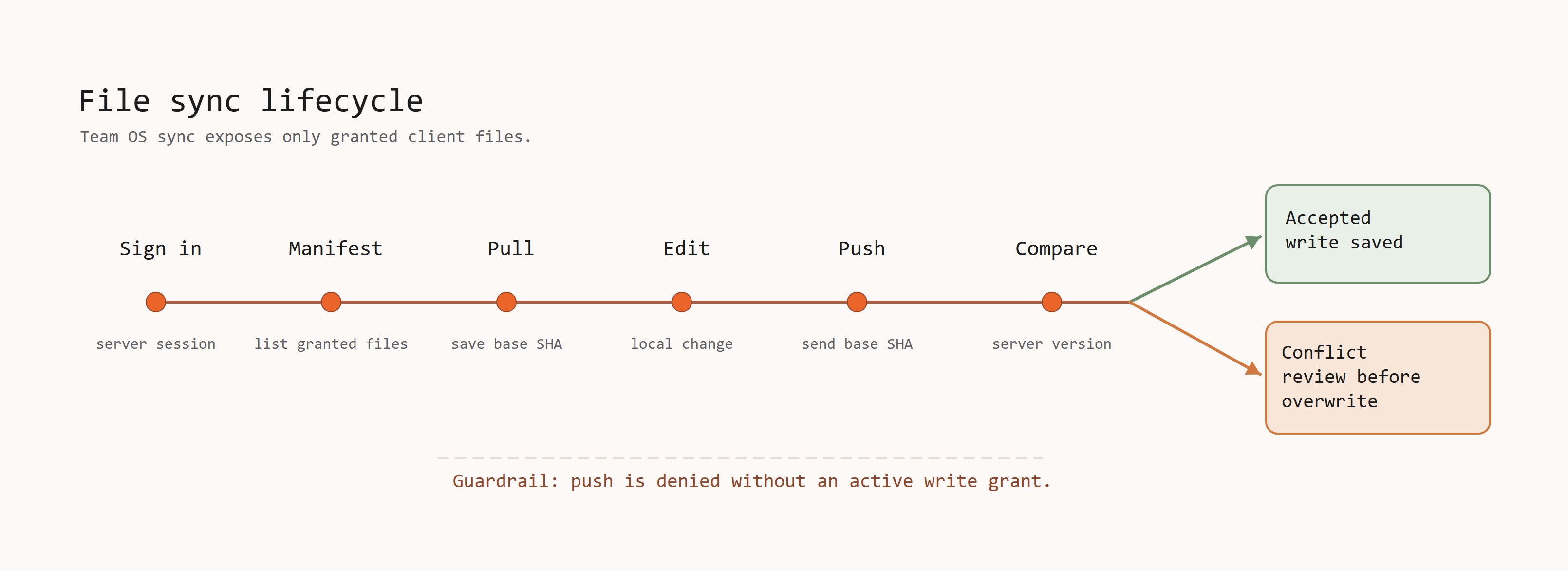
Terminal pull records each server file hash. Terminal push sends the hash saved by the last pull. Command Centre refreshes the current server hash and opens a review before it applies changes. Either flow returns a conflict if the server file changes after its hash check, instead of silently overwriting the newer version.
Team scope
File requests use the selected Team, but the server resolves and checks the real user and Team again. Changing an ID or path cannot reach a Team that the signed-in user is not authorized to access.
Switching Teams changes the default for new sync requests. Existing tasks keep their original Team and client scope.
Next: Command Centre sync