
Capture and review
Capture flow
Understand local and hosted Team OS session capture.
The Claude Stop hook starts session capture in the background. It does not slow down the active chat.
Capture writes two local files:
| File | Purpose |
|---|---|
context/memory/YYYY-MM-DD.aos.md | Machine-owned summary blocks used for backup and future re-indexing. |
context/transcripts/YYYY-MM-DD/*.jsonl | Raw transcript archive. This stays local and should not be committed. |
When the local workspace is signed in to Team OS, the capture is also sent to the hosted API as a staged capture event.
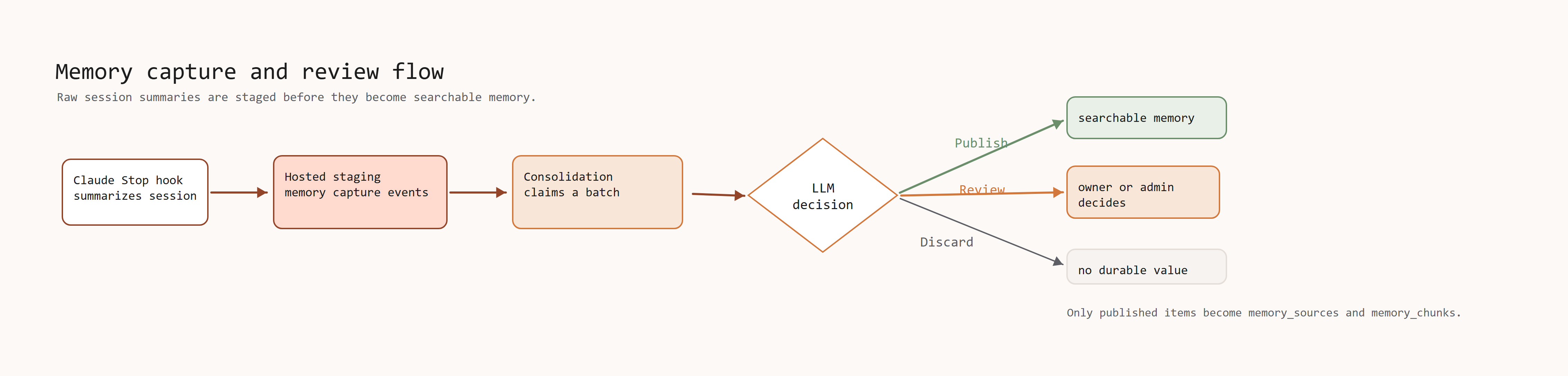
Hosted capture flow
The hosted flow has three steps:
- The local workspace sends a summarized block to
/v1/memory/captures. - The local workspace starts a quiet consolidation run after staging the capture.
- The hosted server stores the capture, lets the workspace claim it, and
accepts the final result through
/v1/memory/consolidation/complete.
The consolidation script claims staged captures from
/v1/memory/consolidation/claim.
Most users do not need to run consolidation after each session. The background run is quiet and processes captures when they are eligible.
The consolidation step asks an LLM to choose one result for each item:
| Result | Meaning |
|---|---|
publish | Create final team or client memory. Published memory becomes searchable. |
review | Keep the item out of recall until a user with Full access decides. |
discard | Drop captures that have no durable memory value. |
Only published items become memory_sources and memory_chunks.
Next: Capture consolidation