
Team OS concepts
Learn how a hosted server controls shared Agentic OS access.
Team OS lets a hosted server control shared Agentic OS access. The local workspace still runs on the user's machine, but the server decides which Company, Teams, clients, skills, files, and memory the user can access.
Mental model
| Part | Meaning |
|---|---|
| Hosted server | The source of truth for identity, access, shared content, and audit events. |
| Company | The top-level group that contains all Teams on one hosted server. |
| Team | A shared group with its own members, clients, skills, context, memory, and files. |
| User | A server-managed identity that can have access to more than one Team. |
| Client | A work area inside one Team, usually for one customer, brand, or project. |
| Grant | A server-side permission for Company access, or for a Team Member's client or skill access. |
| Local profile | Saved connection state for one hosted server and user. |
| Work scope | The fixed server, user, Team, and optional client saved with a task or conversation. |
Source of truth
The hosted server stores and checks:
- users and Company roles;
- Teams and direct Team memberships;
- Company access requests and grants;
- clients and member client grants;
- shared skills and member skill grants;
- shared and private memory;
- allowed workspace files;
- audit events.
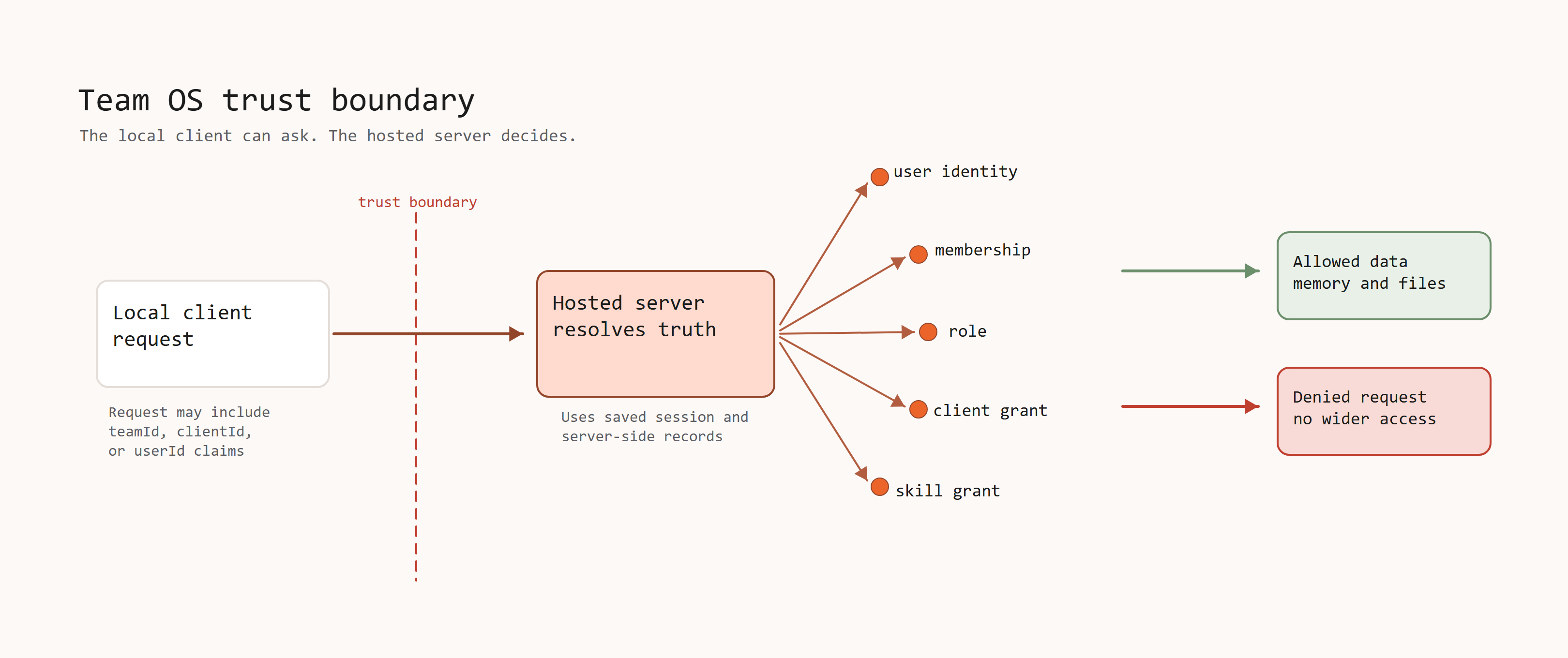
A local workspace can request a Team or client. It cannot decide its own user, role, or access.
Effective Team access
Access to a Team can come from Company ownership, an active Company grant, or a direct Team role. Team Owners and Team Admins have Full access to their Team. Team Members use explicit client and skill grants.
Login and Team selection
The terminal and Command Centre share Team OS login state when they use the same Team OS config directory.
The local profile belongs to the server and user. The user can select any active Team that the server says is accessible. Selecting another Team changes the default for new work, not the scope of existing tasks.
See Companies and multiple Teams.
Server-side identity
Team OS does not trust identity sent by the local workspace.
For example, a request can include a Team ID or client ID. The server first resolves the real user from the signed session or server-issued token. It then checks that user's current Company, Team, client, and skill access.
Sending a different teamId, clientId, or userId cannot widen access.
Memory scopes
| Scope | Who it is for |
|---|---|
| System | Shared baseline memory for the Agentic OS installation. |
| Team | Users with effective access to one Team. |
| Client | Full access users, or Team Members with access to one client. |
| Private | One signed-in user. |
The server replaces Team and user identity in memory requests with the trusted identity from the session. Private memory always belongs to the signed-in user.
File access
Team OS exposes only allowed files for clients the user can access. Full access users can reach every active client in their Team. Team Members see only clients granted by the server.
The local workspace never receives general access to the server filesystem. Sensitive local state, transcripts, generated stores, and build folders stay outside normal Team sync.